Request Signing
Every request to Nopan must be digitally signed. This ensures authenticity, integrity, and non-repudiation of the data you send. The process relies on an asymmetric key pair (private + public key). You use your private key to sign requests; Nopan uses your registered public key to verify them.
This guide outlines how to:
- Generate public and private keys
- Share your public key with Nopan
- Construct a valid signature base
- Include your
SignatureandSignature-Inputheaders and send them with your API requests
Step 1: Generate your key pair
Before you can sign requests, you need a key pair: a private key for signing and a public key for verification. The private key remains secure on your side; the public key is shared with Nopan.
Nopan supports well-known signing algorithms that provide strong security guarantees and are widely compatible with standard cryptographic libraries. Refer to this table to see what signing algorithms we support.
Keys submitted to Nopan are valid for up to 12 months.
After this period, they must be rotated to ensure continued ability to sign and verify requests.
Nopan will notify you in advance before any key expiration.
We recommend using at least NIST P-256 curve for ECDSA.
Example using ECDSA with the NIST P-384 (secp384r1) curve:
# Generate the private key
openssl ecparam -name secp384r1 -genkey -noout -out private_key.pem
# Extract the public key
openssl ec -in private_key.pem -pubout -out public_key.pem
Do not reuse the same private key you used for mTLS certificate. You must generate a new key pair for request signing.
Don’t store private keys unencrypted at rest. Use a secret manager or a key management service.
Alternatively, encrypt the private key:
openssl ec -in private_key.pem -aes256 -out encrypted_key.pem
Step 2: Submit your public key to Nopan
If this is your first time setting up digital signatures with Nopan, upload public_key.pem to our portal,
for the sandbox or production environment.
Send only the public key file.
Never send your private key.
Within the portal, you can access both sandbox and production environments.
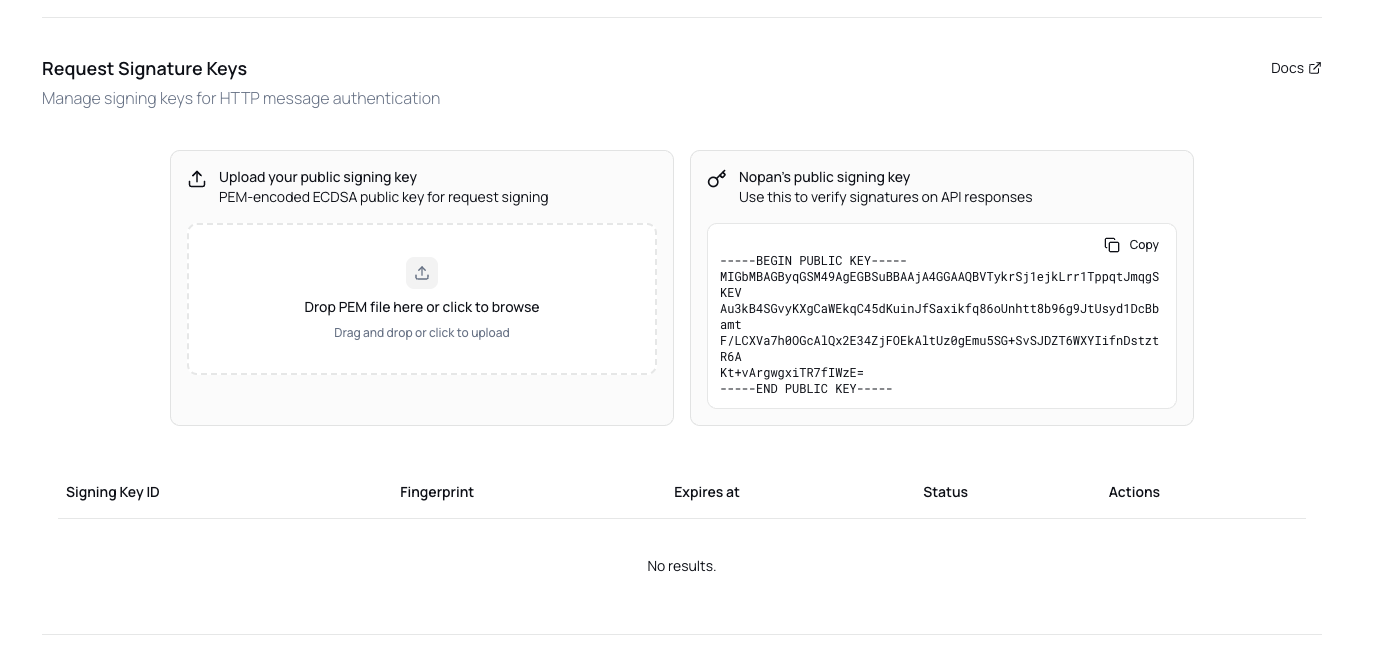
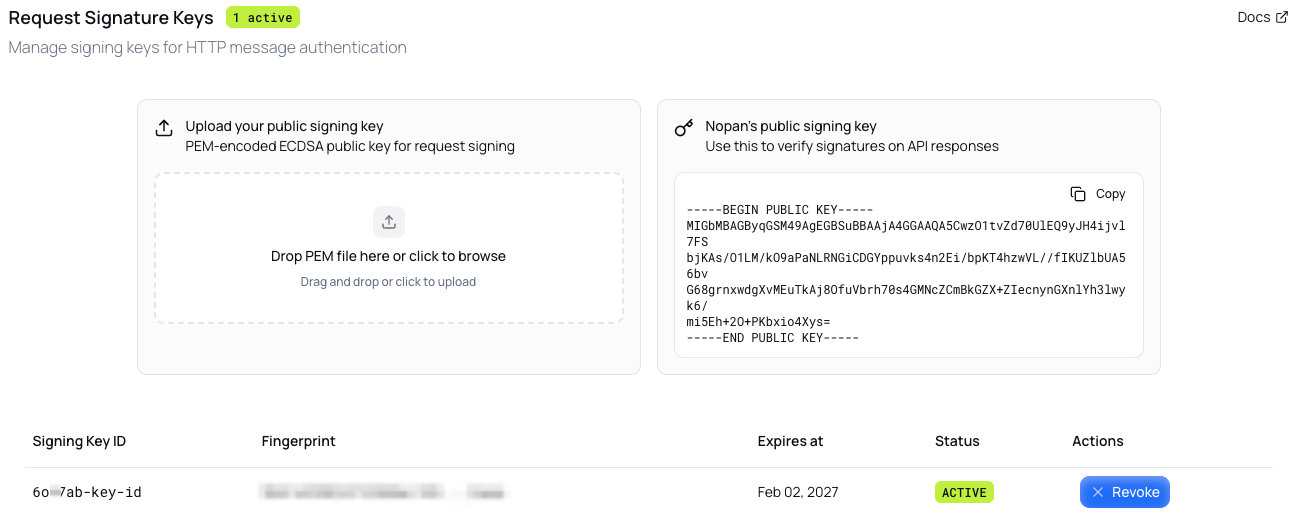
Once done, you will be able to see a unique Signing Key ID (used in the signature input).
Step 3: Build the Request Signature
First, understand what is involved in signature building by following the Understanding Signatures guide.
The signature base is a canonicalized string constructed from selected components of the HTTP request.
This base string is what gets signed and verified.
Order and formatting are critical - both sides must build the base identically.
- Each component follows the format:
"<component_name>": <value>. Note double quotes around the component name, colon and a single space after the component name, and that value has no additional characters around it. - Name (but not value) of each component is brought to lower case.
- Each component is put on a separate line.
- Each line is concatenated with a newline character (\n), hex value
0x0a. There is no trailing newline.
Components of request signature base
For requests without a body, content-digest, content-type, and content-length should be omitted.
The @signature-params field is always required and explicitly lists the inputs that were used to create the signature.
Read more about how to construct it here.
Examples
Once the request signature base is constructed it should look like this:
- Request with body
- Request without body
"@authority": api.nopan.io
"@method": POST
"@request-target": /payments/initiate
"content-digest": sha-256=:Base64EncodedHashOfBody==:
"content-type": application/json
"content-length": 123
"@signature-params": nopan_sig=("@authority" "@method" "@request-target" "content-digest" "content-type" "content-length");keyid="your-key-id";created=1766678793
"@authority": api.nopan.io
"@method": GET
"@request-target": /payments/{id}/status
"@signature-params": nopan_sig=("@authority" "@method" "@request-target");keyid="your-key-id";created=1766678793
Make sure to select the correct API base url for the environment:
- sandbox: https://api.sandbox.nopan.dev
- production: https://api.nopan.io
You can also test your signature with the Signature Debugger tool in portal, available for the sandbox and production environments.
created value is a UNIX timestamp (seconds) in UTC when the signature was created.
Step 4: Sign the request
Use your private key to sign the base string.
- Java
- JavaScript
import java.nio.charset.StandardCharsets;
import java.nio.file.Files;
import java.nio.file.Paths;
import java.security.KeyFactory;
import java.security.PrivateKey;
import java.security.Signature;
import java.security.spec.PKCS8EncodedKeySpec;
import java.util.Base64;

public class SignRequest {

    public static void main(String[] args) throws Exception {
        // The signature base — built from your request's components.
        // See /guides/authentication/understanding-signatures for the canonicalization rules.
        // Also, https://portal.nopan.com/sandbox/signing-keys has a debugger where you can generate
        // the signature base for your request own body.
        String signatureBase = ""
            + "\"@authority\": api.sandbox.nopan.dev\n"
            + "\"@method\": POST\n"
            + "\"@request-target\": /payments/initiate\n"
            + "\"content-digest\": sha-256=:vN+J+sB1lDV6KmUQpDLO0aYhJBp7N+EVcU8Y2L9PYz0=:\n"
            + "\"content-type\": application/json\n"
            + "\"content-length\": 83\n"
            + "\"@signature-params\": nopan_sig=(\"@authority\" \"@method\" \"@request-target\" \"content-digest\" \"content-type\" \"content-length\");keyid=\"your-key-id\";created=1766678793";

        // Same string as the @signature-params line; sent as the Signature-Input header value.
        String signatureInput = "nopan_sig=(\"@authority\" \"@method\" \"@request-target\" \"content-digest\" \"content-type\" \"content-length\");keyid=\"your-key-id\";created=1766678793";

        // Load the private key. Java's PKCS8EncodedKeySpec only accepts PKCS8;
        // if your key was generated as SEC1 (the default for `openssl ecparam -genkey`),
        // convert it first:
        //   openssl pkcs8 -topk8 -nocrypt -in private_key.pem -out private_key.pem
        String pem = Files.readString(Paths.get("private_key.pem"));
        byte[] keyBytes = Base64.getDecoder().decode(pem
            .replace("-----BEGIN PRIVATE KEY-----", "")
            .replace("-----END PRIVATE KEY-----", "")
            .replaceAll("\\s", ""));
        PrivateKey privateKey = KeyFactory.getInstance("EC")
            .generatePrivate(new PKCS8EncodedKeySpec(keyBytes));

        // Pick the algorithm that matches your key's curve:
        //   P-256 → "SHA256withECDSA"
        //   P-384 → "SHA384withECDSA"
        //   P-521 → "SHA512withECDSA"
        Signature signer = Signature.getInstance("SHA384withECDSA");
        signer.initSign(privateKey);
        signer.update(signatureBase.getBytes(StandardCharsets.UTF_8));
        String signature = Base64.getEncoder().encodeToString(signer.sign());

        // Both headers must be sent on the request.
        System.out.println("Signature: nopan_sig=:" + signature + ":");
        System.out.println("Signature-Input: " + signatureInput);
    }
}
Support for Encrypted PEMs
This implementation assumes the private key is stored as an unencrypted PEM file.
We recommend storing encrypted PEM keys (e.g. protected with -aes256), Java's built-in KeyFactory will not be able to load them. You’ll need to use a library like BouncyCastle, which can:
- Parse encrypted PEM formats
- Programmatically decrypt keys using a passphrase
This is most useful if you load keys at runtime from a secure secrets manager or encrypted file system.
const fs = require('fs');
const { createSign } = require('crypto');

// See /guides/authentication/understanding-signatures for the canonicalization rules.
// Also, https://portal.nopan.com/sandbox/signing-keys has a debugger where you can generate
// the signature base for your own request body.
const signatureBase =
  '"@authority": api.sandbox.nopan.dev\n' +
  '"@method": POST\n' +
  '"@request-target": /payments/initiate\n' +
  '"content-digest": sha-256=:vN+J+sB1lDV6KmUQpDLO0aYhJBp7N+EVcU8Y2L9PYz0=:\n' +
  '"content-type": application/json\n' +
  '"content-length": 83\n' +
  '"@signature-params": nopan_sig=("@authority" "@method" "@request-target" "content-digest" "content-type" "content-length");keyid="your-key-id";created=1766678793';

// Same string as the @signature-params line; sent as the Signature-Input header value.
const signatureInput =
  'nopan_sig=("@authority" "@method" "@request-target" "content-digest" "content-type" "content-length");keyid="your-key-id";created=1766678793';

const privateKey = fs.readFileSync('private_key.pem', 'utf8');

// Pick the algorithm that matches your key's curve:
//   P-256 → 'SHA256'
//   P-384 → 'SHA384'
//   P-521 → 'SHA512'
const signer = createSign('SHA384');
signer.update(signatureBase);
signer.end();
const signature = signer.sign(privateKey, 'base64');

// Both headers must be sent on the request.
console.log(`Signature: nopan_sig=:${signature}:`);
console.log(`Signature-Input: ${signatureInput}`);
Step 5: Attach the Headers
Each request must include:
Signature: The Base64-encoded signature value.Signature-Input: The same string as@signature-params.
Examples
Signature: nopan_sig=:<signature>:
Signature-Input: nopan_sig=("@authority" "@method" "@request-target" "content-digest" "content-type" "content-length");keyid="your-key-id";created=1766678793
At the end you will have:
curl -X POST https://api.nopan.io/payments/initiate \

  -H "Authorization: Bearer <access-token>" \
  -H "Idempotency-Key: 63c2e3f0-12aa-41bb-ae62-f3d91fdbb762" \
  -H "Signature: nopan_sig=:<signature>:" \
  -H "Signature-Input: nopan_sig=(\"@authority\" \"@method\" \"@request-target\" \"content-digest\" \"content-type\" \"content-length\");keyid=\"<key>\";created=1766678793" \
  -H "Content-Type: application/json" \
  -d '{"clientTransactionId":"order123","paymentDetails":{"amount":100,"currency":"EUR"}}'
If the signature is missing or invalid, Nopan will return 401 Unauthorized.
See Error Handling for more details.
Supported Signing Algorithms
There are certain restrictions on a key-algorithm pair you can use for request signing.
Allowed EC signing algorithm combinations
Column Hash algorithm refers to the hash algorithm used by the signing algorithm.
It is different from the hash algorithm used to generate the Content-Digest header.
Nopan accepts sha-256, sha-384, and sha-512 for content digests, and uses sha-512 by default when signing responses.
See this section for more details.
Key Lifecycle
Request signing keys follow a predictable lifecycle from generation to rotation. Nopan will proactively notify you before your keys expire (12 months), giving you time to rotate keys without disrupting your integration.