Reporting
Our reporting suite is designed for maximum transparency and ease of reconciliation. We provide detailed, granular data to give you complete visibility into every stage of the payment process.
Nopan provides five report types and flexible options for retrieving them depending on your operational needs:
- Secure file transfer (SFTP)
- Manual download through our portal
- Programmatic access through REST APIs
Report Types
Nopan provides five report types, each serving a distinct reconciliation and auditing purpose:
Transaction Details
This report provides a full audit trail of all transactions, showing the last lifecycle status for each one. It outlines the final outcome of each payment:
- Successful payments appear as a single entry.
- Failed payments are represented by two entries - the last successful event that occurred and the final event indicating the failure.
For payments that failed, the successful event immediately preceding the failure is always included in the report.
For the full list of status and event_type values, see Lifecycle.
Fee Details
This report provides a detailed, per-transaction breakdown of every fee incurred. It itemizes all processing, settlement, and chargeback fees applied to a transaction, as well as non-transaction fees such as periodic or one-time charges.
- Transaction link: Ties each fee directly back to a
transaction_id. For non-transaction-related fees, this value will not be present. - Fee type and origin: Identifies the
fee_typeand the party to whom the fee was applied - either Nopan or our payment provider - along with the precise fee amount in the processing currency.
Settlement
This report shows how transactions are grouped into payouts and provides the financial impact of settled transactions, refunds, and chargebacks within a specific payout batch.
- Payout grouping: The
payout_idlinks all transactions settled in the same batch. - Financial breakdown: Exposes the original
gross_credit(orgross_debitfor refunds), individual fees applied by Nopan and the provider, and the resultingnet_creditornet_debit. - Reconciliation link: The
bank_referenceandsettlement_dateensure you can match net totals with the funds transferred to your bank.
Non-settled, failed, or incomplete transactions do not appear in the settlement report.
Bank Addenda
This report provides the high-level aggregate view necessary for matching the physical transfer of funds to your bank statement. It offers a concise, one-line summary for each bank transfer (payout batch).
- Payout summary: Shows the unique
payout_id, the totaltransaction_count, the aggregategross_total, the totalfee_totaldeducted, and the finalnet_totaltransferred. - Bank matching: The
bank_referenceis the identifier that will appear on your bank statement, ensuring immediate, reliable reconciliation of the incoming transfer.
Invoice
This report is a formal billing document issued by Nopan for a given billing period. It covers three key areas:
- Invoice details: Invoice identifier, billing period, issue date, due date, currency, and current status.
- Fee breakdown: Details on charges applied during the period, grouped by fee type.
- Payment instructions: Description of the invoice settlement process.
Retrieving Reports
We have three delivery channels available:
1. Hosted SFTP
Reports are automatically deposited on the Nopan SFTP server for your organization, in folders for each contractual entity, following a pattern as below:
outbound/{organization_id}/{entity_id}/{year}/{month}/{day}/
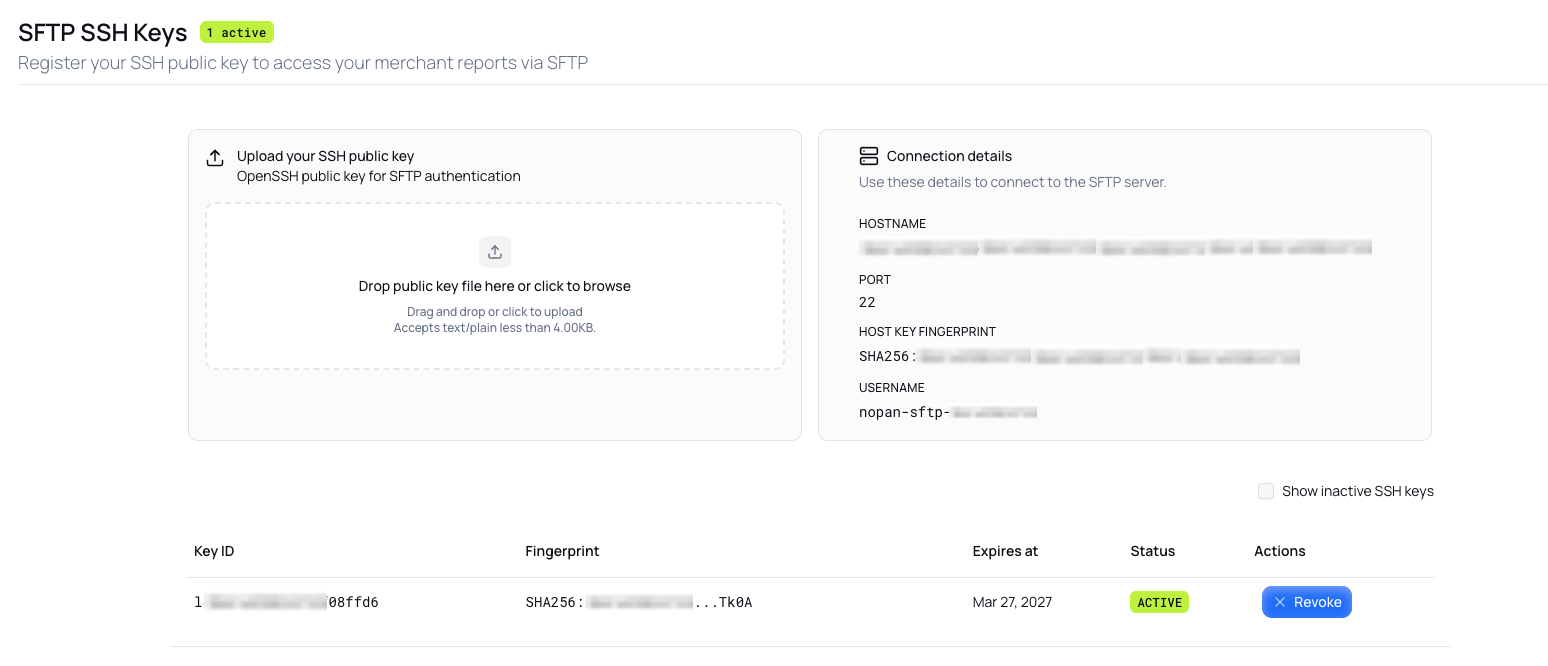
You can set up your access to Nopan SFTP server through portal for sandbox and production environments following these steps:
- Generate your ssh key pair.
ssh-keygen -t ed25519
- Upload your public key
your-ssh-key-name.pubto the portal.
Send only the public key file.
Never send your private key.
- SFTP connection details will be displayed on portal, including your
username.
- Access is scoped per directory - each client can only navigate their own organization folder.
- Authentication requires specific credentials (username and your private ssh key).
- SSH keys can be revoked from portal.
2. Portal
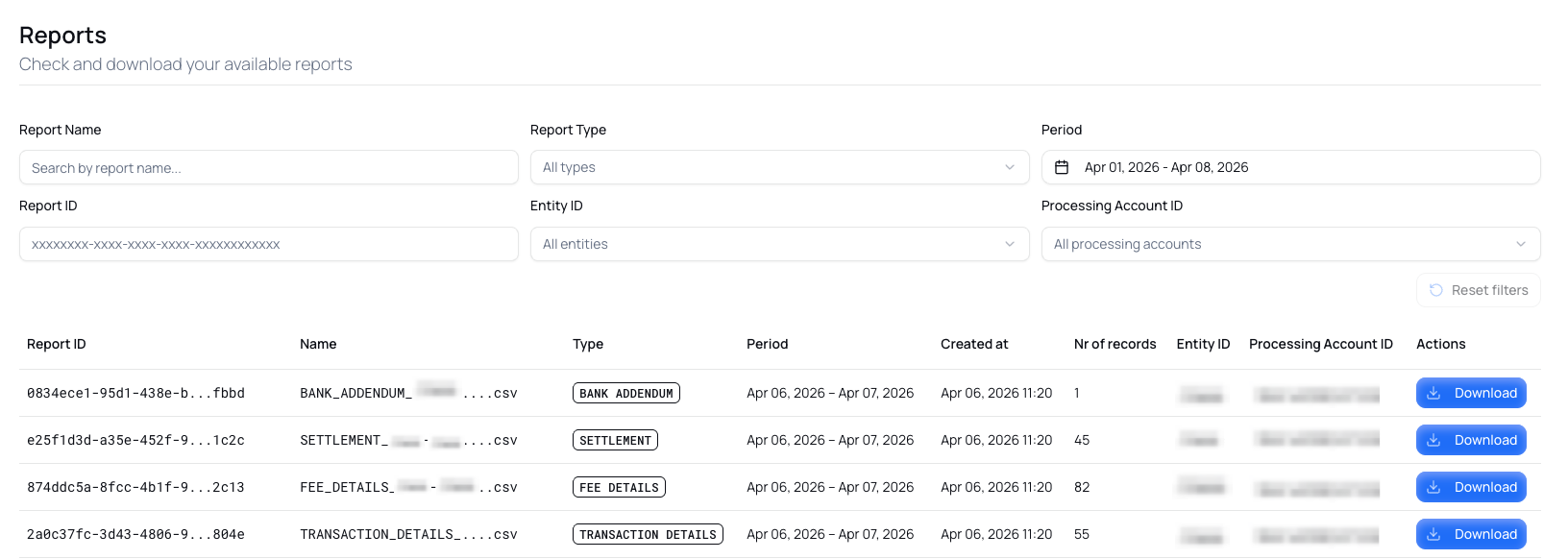
Log into the Nopan Merchant Portal for sandbox or production to view, filter, and download available reports. You can filter by name, type, date range, id, entity, and processing account directly from the UI.
This is useful for finance teams or ad-hoc reporting needs.
3. REST API
Reports can be retrieved programmatically through the Reports API, enabling full automation.
Examples:
List reports:
GET /reports?from=2026-01-01T00:00:00Z&to=2026-12-31T23:59:59Z&processingAccountId=<some-account-id>
Authorization: Bearer <access-token>
Download a report:
GET /reports/download?reportId=<some-report-id>
Authorization: Bearer <access-token>
Check our API docs to see more details regarding available parameters.
Authentication is handled the same way as other Nopan APIs: with mTLS and access tokens.
Error Handling
When retrieving reports, you may encounter errors:
Never process financial data or trigger business logic on unverified or corrupted reports.