How to create a processing account
A processing account is where payments for one payment method are processed and settled in one currency. To accept payments with several payment methods, or to be paid out in several currencies, you create one processing account for each.
You can create processing accounts in two ways:
- the API, to set up many accounts from your own systems, several in the same request;
- the portal, through a guided form.
This page explains each field, when it is required, and how to use each option.
You need the ID of the contractual entity the account will belong to, and your organization type. Both can be found in Portal > Organization page for sandbox and production environments.
Fields
Base fields
These describe the account itself, and they are the same for every organization type and payment method.
Always required
| Field | Description |
|---|---|
contractualEntityId | The contractual entity the account is created under. |
name | A name for the account, up to 100 characters. For a PAYFAC organization, it is the name of the merchant (DBA - Doing Business As) the account is for. |
settlementCurrency | The currency the account is paid out in, as an ISO 4217 code such as EUR. An account has a single settlement currency. |
providerId | The payment method of the account, such as BLIK or IRIS. An account has one payment method. |
bankAccount | The payout destination of the account. See Bank account. |
Optional
| Field | Description |
|---|---|
processingAccountId | Unique identifier for the account, between 6 and 15 characters. When nothing set, Nopan generates one and returns it in the response. |
Bank account
bankAccount is made of a type and a number. The number must be valid for its type:
| Type | Number |
|---|---|
IBAN | 15 to 34 letters and digits, with a valid country code and checksum. |
SWIFT | An 8 or 11 character SWIFT/BIC code. |
ABA | 9 digits, with a valid checksum. |
ACCOUNT_NUMBER | 4 to 34 letters and digits. |
Merchant details
merchantDetails describes the business the account is for. Which of its fields you must send depends on your
organization type and the payment method. When you send them, every field is checked for format and length.
PAYFAC organization type
A PAYFAC organization creates one processing account for each of its merchants, so these are the details of that
merchant.
| Field | Description | Required |
|---|---|---|
legalEntityName | Legal name of the business, up to 255 characters. | Always |
address | Registered address, up to 500 characters. | Always |
city | City, up to 100 characters. | Always |
countryCode | Country, as an ISO 3166-1 alpha-2 code such as DE. | Always |
mcc | Merchant category code, 4 digits. | Always |
disputesContactName | Who to contact about disputes, up to 255 characters. | Only when providerId is WERO |
disputesContactEmail | Email of the disputes contact, up to 255 characters. It must be valid. | Only when providerId is WERO |
postcode | Postcode, up to 20 characters. | Never |
vatNumber | VAT number, up to 50 characters. | Never |
taxNumber | Tax number, up to 50 characters. | Never |
registerNumber | Company register number, up to 50 characters. | Never |
riskLevel | LOW, MEDIUM, HIGH or NOT_ACCEPTABLE. | Never |
expectedTotalVolumePerMonth | Expected total volume per month, as a non-negative whole number up to 9,999,999,999,999,999. | Never |
expectedNumberOfTransactionsPerMonth | Expected number of transactions per month, as a non-negative whole number. | Never |
expectedAverageTransactionValue | Expected average transaction value, as a non-negative whole number up to 9,999,999,999,999,999. | Never |
MERCHANT organization type
A MERCHANT organization sends no merchant details, as they were set up during onboarding for your entity. The only exception is Wero:
| Field | Description | Required |
|---|---|---|
disputesContactName | Who to contact about disputes, up to 255 characters. | Only when providerId is WERO |
disputesContactEmail | Email of the disputes contact, up to 255 characters. It must be valid. | Only when providerId is WERO |
A merchant organization can have only one Wero processing account for each contractual entity. A second one is rejected, and so is a request that contains two. Payment facilitators have no such limit.
Create and find accounts
Create an account
Accounts cannot be deleted once created. Review the request before sending it. See After you create the account.
- API
- Portal
Send an array of accounts to the create endpoint. Your access token needs the accounts:write scope (see
Access token).
POST /organization/processing-accounts/create
The complete request and response are in the Create processing accounts operation of the API reference.
The body is an array of accounts, with at most 50. The request is all or nothing: either every account is created or none is.
A merchant organization, with BLIK
[
  {
    "contractualEntityId": "abc123",
    "name": "BLIK account",
    "settlementCurrency": "PLN",
    "providerId": "BLIK",
    "bankAccount": {
      "type": "IBAN",
      "number": "PL61109010140000071219812874"
    }
  }
]
A payment facilitator, with IRIS
[
  {
    "processingAccountId": "pa-1234",
    "contractualEntityId": "abc123",
    "name": "Some Merchant DBA",
    "settlementCurrency": "EUR",
    "providerId": "IRIS",
    "bankAccount": {
      "type": "IBAN",
      "number": "GR1601101250000000012300695"
    },
    "merchantDetails": {
      "legalEntityName": "Some Merchant Ltd",
      "address": "1 Main Street",
      "city": "Athens",
      "countryCode": "GR",
      "mcc": "5411"
    }
  }
]
The response has one entry for each account, in the order you sent them:
[
  {
    "processingAccountId": "pa-1234",
    "contractualEntityId": "abc123",
    "name": "Some Merchant DBA",
    "settlementCurrency": "EUR",
    "providers": ["IRIS"],
    "status": "PROVISIONING"
  }
]
Errors
Every problem of the request is reported at once, so you can fix them in one go. Each one is keyed by the position of the
account in your array and the name of the field, for example [1].bankAccount.number:
{
  "status": "DECLINED",
  "statusInfo": {
    "reasonCode": "4000",
    "message": "Invalid input"
  },
  "fields": {
    "[0].name": "Processing Account name is required",
    "[1].bankAccount.number": "Bank account number is required"
  },
  "callId": "678c62b0177e4bc3-a12309"
}
See the reason codes of the error handling guide for the complete list.
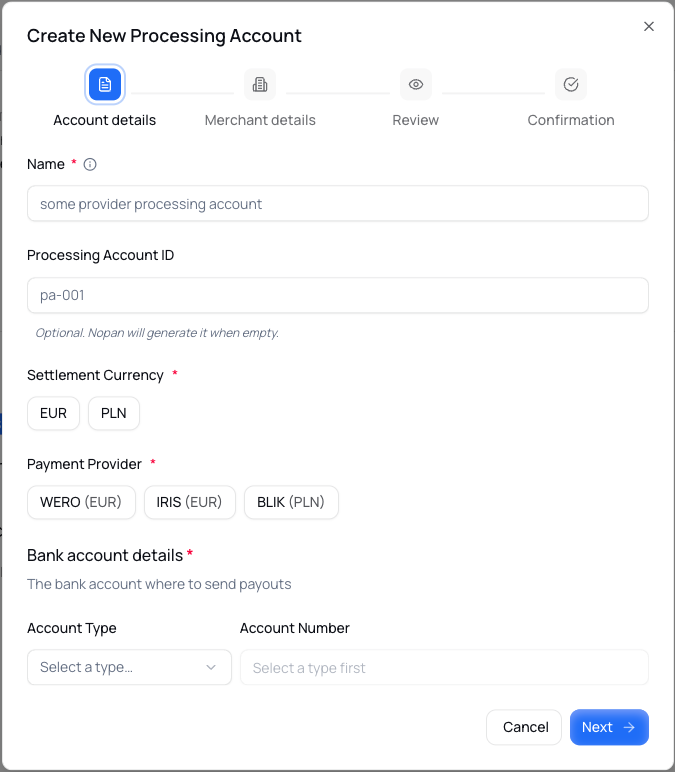
In the portal, creating an account is a guided form on Organization page. The steps you see depend on your organization type and the payment method you choose.
Only users with ADMIN role have the option to create processing accounts.
Find an account
To list your processing accounts, or to check the status of the ones you just created:
- API
- Portal
Use the search endpoint, with the accounts:read scope:
GET /organization/processing-accounts/search
The complete request and response are in the Search processing accounts operation of the API reference.
All the parameters are optional. Without any filter you get all the accounts of your organization, one page at a time:
| Parameter | Description | Default |
|---|---|---|
contractualEntityId | Only the accounts of this contractual entity. | None |
processingAccountId | Only the account with this ID. | None |
providerId | Only the accounts of this payment method, such as BLIK. | None |
status | Only the accounts in this status: PROVISIONING, CREATED, LOCKED, OPENED, DISABLED or CLOSED. | None |
pageNumber | The page to return, starting at 0. | 0 |
pageSize | The number of accounts per page, from 1 to 100. | 50 |
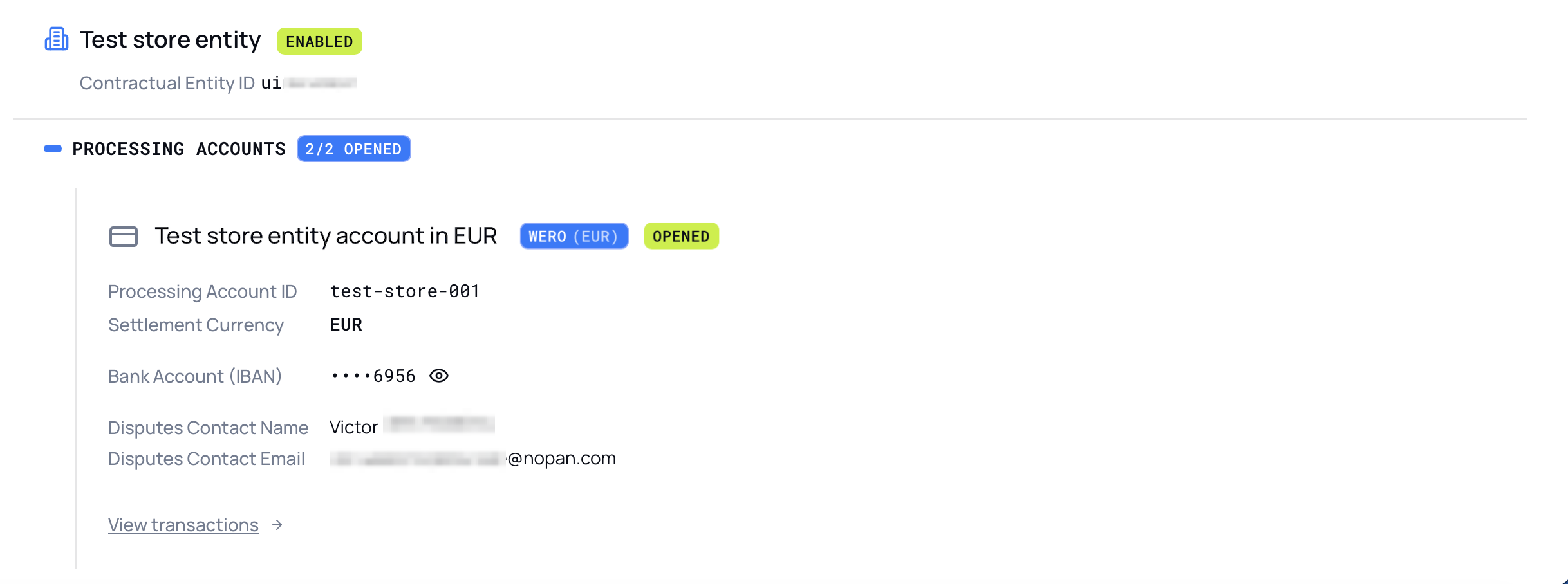
Open the Organization page of the environment you work in. Under each contractual entity, the Processing Accounts section lists its accounts along with its details, when they apply.
After you create the account
As soon as an account is created, Nopan starts setting it up. This means:
- The account can be
DISABLEDorCLOSED, but it is never deleted. - If you set your own
processingAccountId, it cannot be reused for another account. - Only Nopan operators can update the merchant details, including the Wero disputes contact. If any of them need to change, contact support.
A new account is not ready to process payments straight away. It starts as PROVISIONING while Nopan sets it up, and it
moves on to the status that reflects the result:
| Status | Meaning |
|---|---|
PROVISIONING | Nopan is setting the account up. |
CREATED | The setup is done. |
OPENED | The account is verified by a Nopan operator and ready to process payments. |
LOCKED | The account cannot process payments yet, for example because the verification of the business is not complete. |
DISABLED | The account has been switched off. |
CLOSED | The account is closed, and this cannot be undone. |
Use the search endpoint, or the portal, to follow the status. If help needed, contact support.